
No image? Try one of these:
Transform yourself into classic characters from popular Grand Theft Auto (GTA) games, including GTA II, GTA San Andreas, GTA IV, GTA V, and GTA VI. Place yourself in iconic locations like Los Santos, Vice City, Liberty City, and more.
Overchat AI uses GPT Image 2, one of the most advanced image to image editing models to place yourself into the iconic world of GTA games with faithful graphics, realistic HUD overlays, and iconic locations from the games. Here's how to use it:
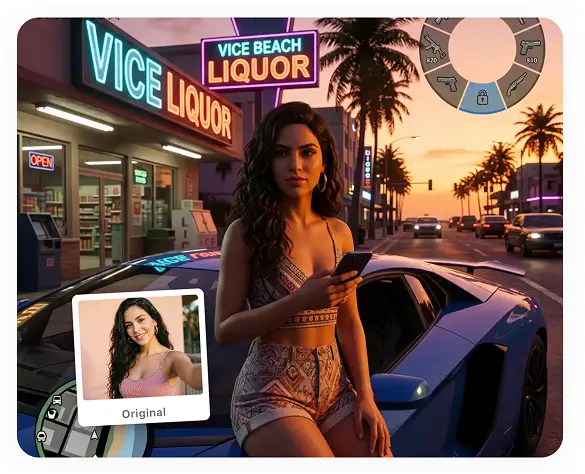
Select a photo from the gallery or snap a selfie on your phone, then click on Generate, and the AI will start rendering you in the style of Rockstar artwork or in-game graphics.
Our AI creates a realistic in-game scene or GTA loading-screen style image in roughly 30 seconds.
Download the image in full HD resolution without watermarks, or share it to social media and surprise your friends on TikTok, Instagram, or Discord with your GTA PFP.
Try Photo to GTA
Create GTA loading screen art illustrations in the style of different GTA titles, from old classics to modern releases.
See yourself as an in game GTA character that works as a GTA PFP for Discord, Instagram, or TikTok.
Create a multi-panel box art layout with yourself, featuring a GTA-style logo and a handdrawn illustration of your character.
Put yourself in the world of your favorite GTA game. From the pixelated graphics of GTA II to the next-generation rendering of GTA VI, the long-awaited Rockstar release.
What would it look like if you were the main character of a GTA game? Answer this question with an AI-generated art in the style of an in-game screenshot from different titles.
Turn yourself into a GTA character with graphics that look like a one-to-one reproduction of GTA II, San Andreas, III, IV, V, and VI titles.
Join thousands of creators already using Overchat AI to create images, generate videos, and write stories with AI.
Overchat AI brings you the power of the world's top AI models: GPT, Claude, Gemini, Mistral, and more.

The Overchat AI photo to GTA generator uses artificial intelligence and image to image technology. It's powered by GPT Image 2, model created by OpenAI. The tool takes a photo or selfie as input, and outputs a stylized, AI generated image that reimagines yourself as a GTA character. It supports realistic in-game screenshots, GTA loading screen art, GTA character PFP, and cover/box art styles stylized to fit the aesthetic of different titles.
Our tool faithfully reproduces the graphics and style of each title, as well as the in-game locations, truly placing you in the world of the Grand Theft Auto franchise. It's not just a filter; it's a new image generated from scratch using one of the most advanced image generation models from 2026. The tool also works well for preserving likenesses; your character model will remain recognizable, even in highly stylized cases, such as the pixel graphics of GTA II.
To chat with yourself on Overchat AI:
1. Upload a photo of yourself, or, if you're using your phone, take a selfie.
2. Choose your title/style from GTA II all the way to GTA VI, as well as the type of image: loading screen art, GTA character PFP, cover/box art, or in-game screenshot.
3. Click Generate, and wait a few seconds while the AI works its magic.
4. Download your GTA portrait.
Yes, absolutely, you can create your GTA PFP on Overchat AI and use it as your profile picture in GTA Online, on Discord, or Instagram and TikTok. You can also generate and export in different aspect ratios: square, which is perfect for PFP images, landscape, or vertical.

Chinese company Baidu has quietly released a model that's just as good as DeepSeek and ChatGPT — ERNIE 4.5 delivers exceptional performance at a fraction of the cost — and most people outside China have never even heard of it.

If you're wondering: what is DeepSeek AI, the answer is quite simple. DeepSeek AI is a Chinese AI research lab that builds large language models. The company released several models in late 2024 and early 2025 that compete directly with OpenAI's GPT-4 and Anthropic's Claude, but at a fraction of the operating cost.

ChatGPT Plus costs $20 per month plus tax, while the Pro plan costs $200 per month plus tax. Understandably, not everyone is willing to pay that much for a chatbot, especially if the premium features aren’t worth it to them. This raises an obvious question: how can I use ChatGPT for free?
Available on Web, iOS, and Android. Access your AI assistant anywhere, anytime.


.svg)
