
In this article, we've compared the 11 best AI photo editors. We tested six of them on the same photo with the same prompt. The other five have no free AI edits or no web version, so we describe their features and prices.
In this article, we've compared the 11 best AI photo editors. We tested six of them on the same photo with the same prompt. The other five have no free AI edits or no web version, so we describe their features and prices.
| AI photo editor | Best for | Tested | Free AI edits | Paid plans from |
|---|---|---|---|---|
| Overchat AI | Overall | Yes | 100 credits a day (4 edits with GPT Image 2.5 Flare) | $14.99/month |
| ChatGPT | Editing in a chat | Yes | Yes, small limit | $8/month |
| Canva | Editing inside designs | Yes | Limited monthly allowance | $18/month |
| Google Gemini | Free editing | Yes | Yes, with usage limits | $19.99/month |
| Adobe Firefly | Commercially safe edits | Yes | 3 a day with Firefly Image 5 | $9.99/month |
| Picsart | Large model catalog | Yes | Free models only | $15/month |
| Adobe Photoshop | Professional retouching | No | Yes, in the mobile app | $7.99/month |
| Google Photos | Phone editing | No | Yes, in the mobile app | Free |
| Photoroom | Product photos | No | No | $12.99/month |
| Fotor | Single-purpose AI tools | No | No | $39.99/year |
| Pixlr | Low-cost paid plan | No | No | $1.99/month |
AI photo editors can be categorized into 4 main types, which mainly differ in how you control the edit and how much control you have over the result:
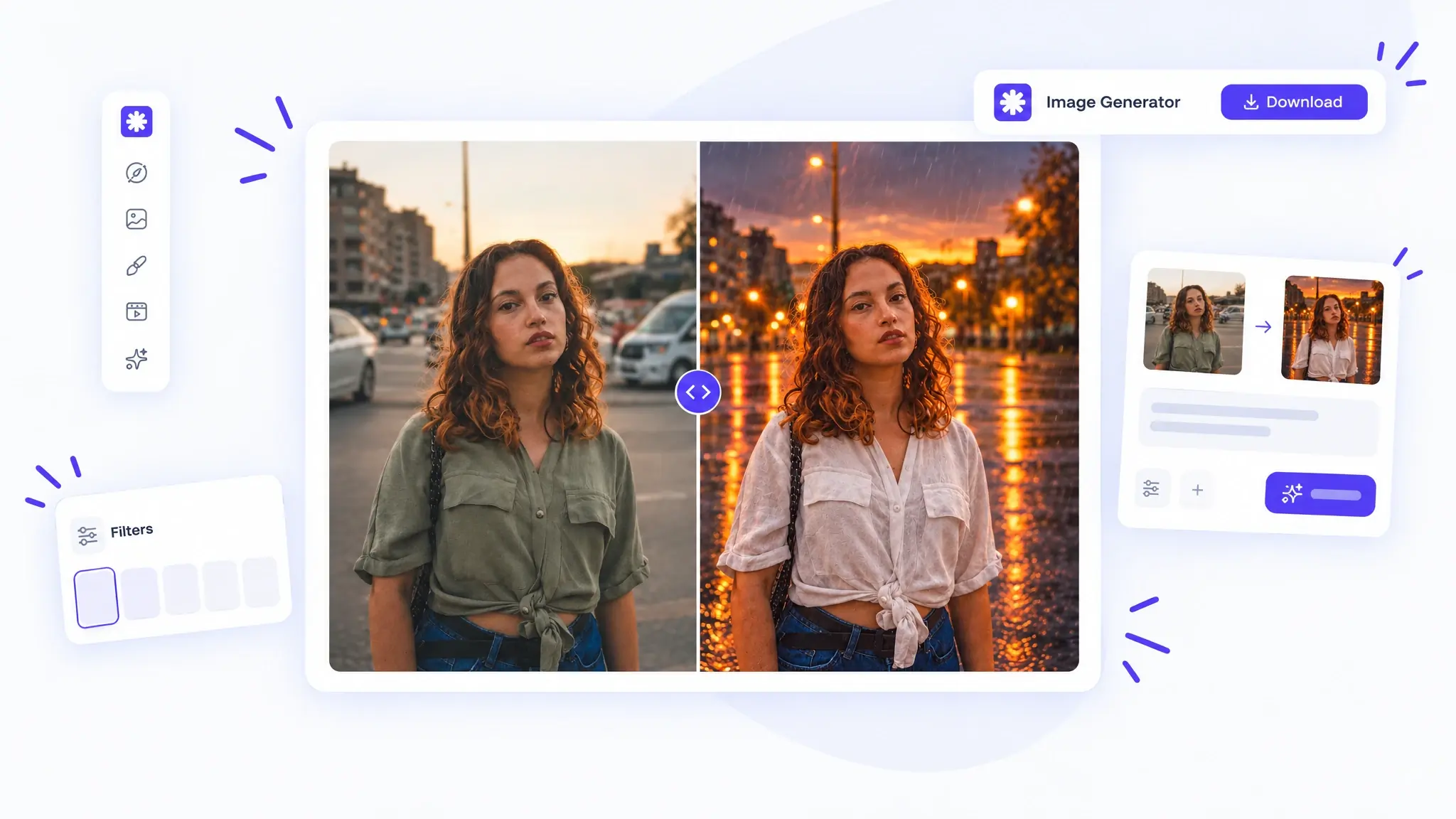
For the test, we used this image:

With the following prompt:
Remove all the cars and the white van from the street behind her. Change her olive green shirt to a white linen shirt. Make it a rainy evening with wet, reflective asphalt and glowing street lights. Keep her face, hair, pose and expression exactly the same.
This setup tests if the app can:
Overchat AI is an AI aggregator with chat, image and video models in one app. In its Image Generator, you can edit a photo with GPT Image 2.5 Flare, GPT Image 2.5 Sunburst, Nano Banana 2, Nano Banana Pro and other image models. You can also select several models at once and compare their results side by side.
We tested Overchat AI with GPT Image 2.5 Flare, the model behind its AI photo editor. The edit took about 40 seconds. Overchat AI removed the cars and the van, changed the shirt to white linen, and made the street wet, with light rain and rows of glowing street lights. The sky stayed orange, so the scene looks more like a rainy sunset than an evening. The face and pose match the original.

Price:
Free users get 100 credits a day. An edit with GPT Image 2.5 Flare costs 25 credits, so the free plan covers four edits a day.
| Plan | Price | What you get |
|---|---|---|
| Free | $0 | 100 credits a day |
| Pro | $14.99/month or $49.99/year | 8,000 credits a month, all models |
ChatGPT is OpenAI's AI assistant. It edits photos with GPT Image 2.5, one of the best image editing models at the time of writing. You attach a photo to the chat, describe the change, and can ask for more changes in follow-up messages.
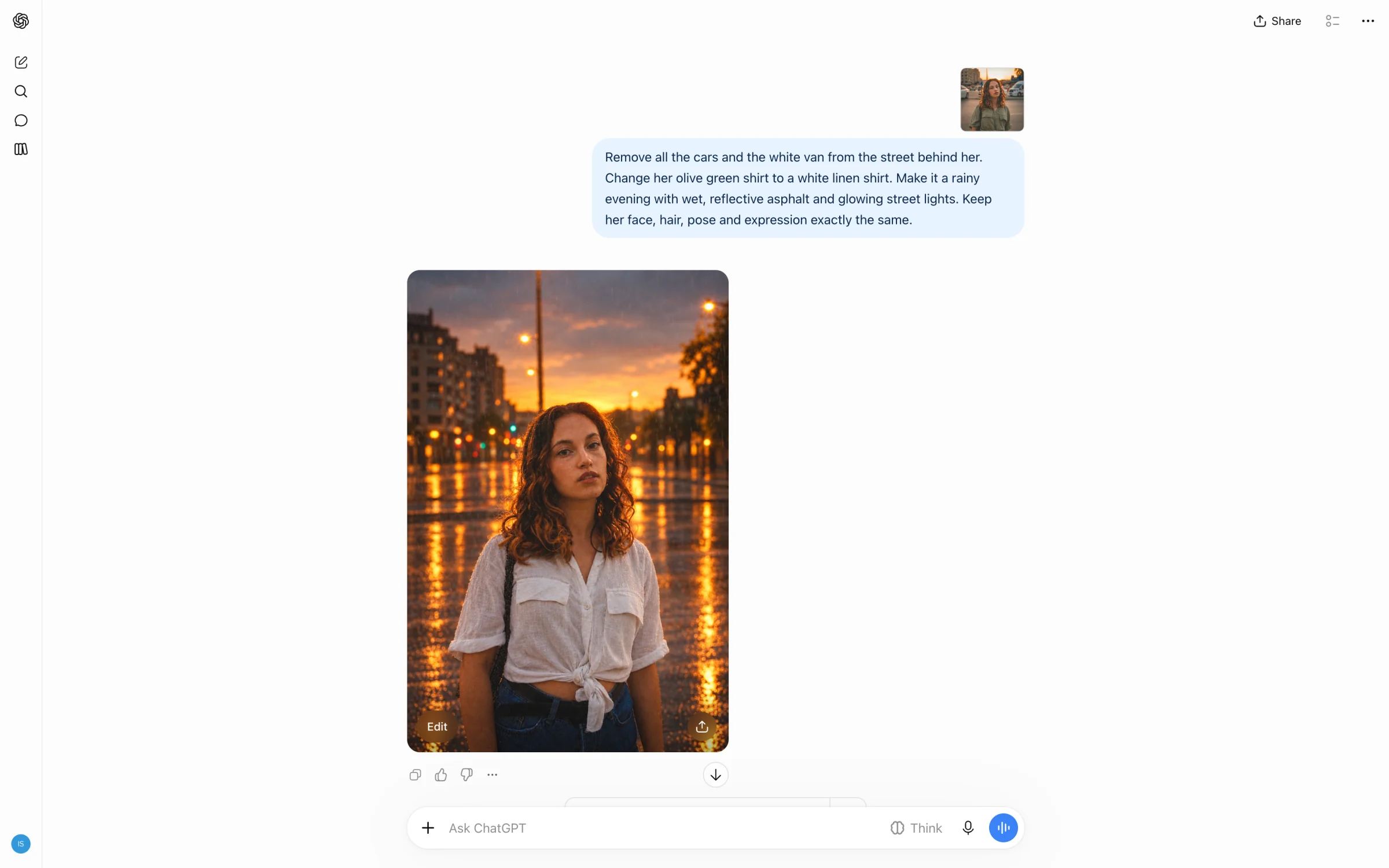
ChatGPT removed the cars and the van, changed the shirt to white linen, and added rain and a wet, reflective street. Like Overchat AI with GPT Image 2.5 Flare, it kept a golden sunset sky. The woman's face came out slightly smoothed.
Price:
Free users can edit a few photos a day, and the limit changes with demand. ChatGPT Go and Plus raise the limit.
| Plan | Price | What you get |
|---|---|---|
| Free | $0 | Image editing with a small limit |
| Go | $8/month | Higher limits |
| Plus | $20/month | Higher image limits, newest models |
| Pro | $200/month | Highest limits |
Canva is an online design platform for social media posts, presentations and other designs. Canva AI is its built-in assistant: you upload a photo, describe the change in a chat, and can open the result in the Canva editor.
Canva AI made all four edits in under a minute. It removed the cars and the van, changed the shirt to white linen, and made the street wet under a dusk sky, without falling rain. Canva is the only editor in our test that returned the photo at its original size, 1600×2400. Canva doesn't say which image model Canva AI uses.

The free plan includes a limited number of Canva AI uses a month. Canva Pro raises the limit and adds Magic Eraser, Magic Expand and Magic Edit.
Price:
| Plan | Price | What you get |
|---|---|---|
| Free | $0 | Limited monthly Canva AI uses |
| Pro | $18/month or $180/year | Higher AI allowance, all Magic Studio tools |
| Business | $25/month or $250/year per person | Pro features for teams |
Google Gemini is Google's AI assistant. It edits photos with Google's Nano Banana image models.
Gemini made all four edits: it removed the cars and the van, changed the shirt to white linen, and turned the scene into a blue rainy evening with a wet street and glowing lamps. The face and hair match the original. Gemini returned a smaller image than the one we uploaded, 842×1264.
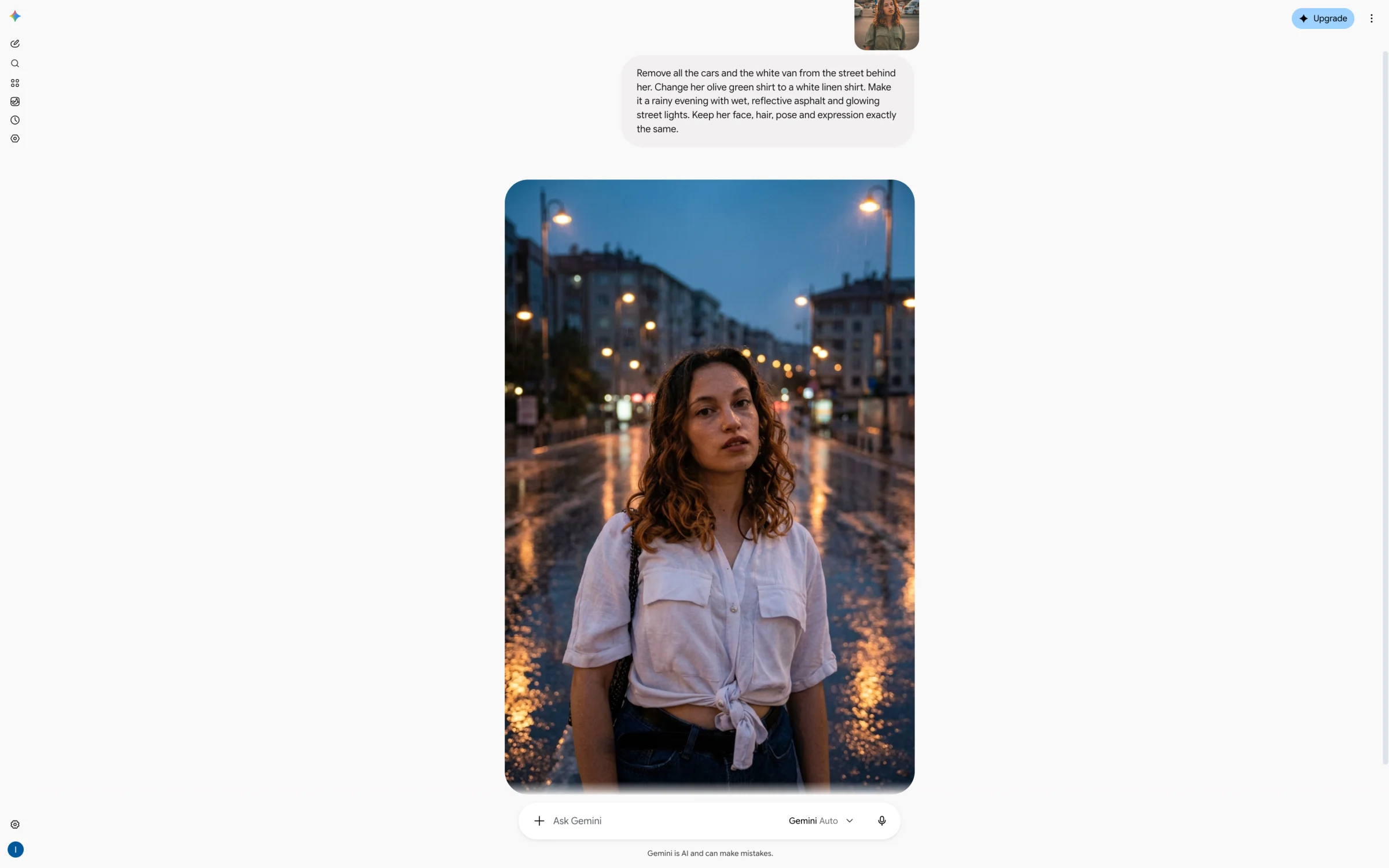
Photo editing is free with a usage limit. The paid Google AI plans raise the limit and add Nano Banana Pro.
Price:
| Plan | Price | What you get |
|---|---|---|
| Free | $0 | Photo editing with usage limits |
| Google AI Pro | $19.99/month | Higher limits, Nano Banana Pro |
| Google AI Ultra | $249.99/month | Highest limits |
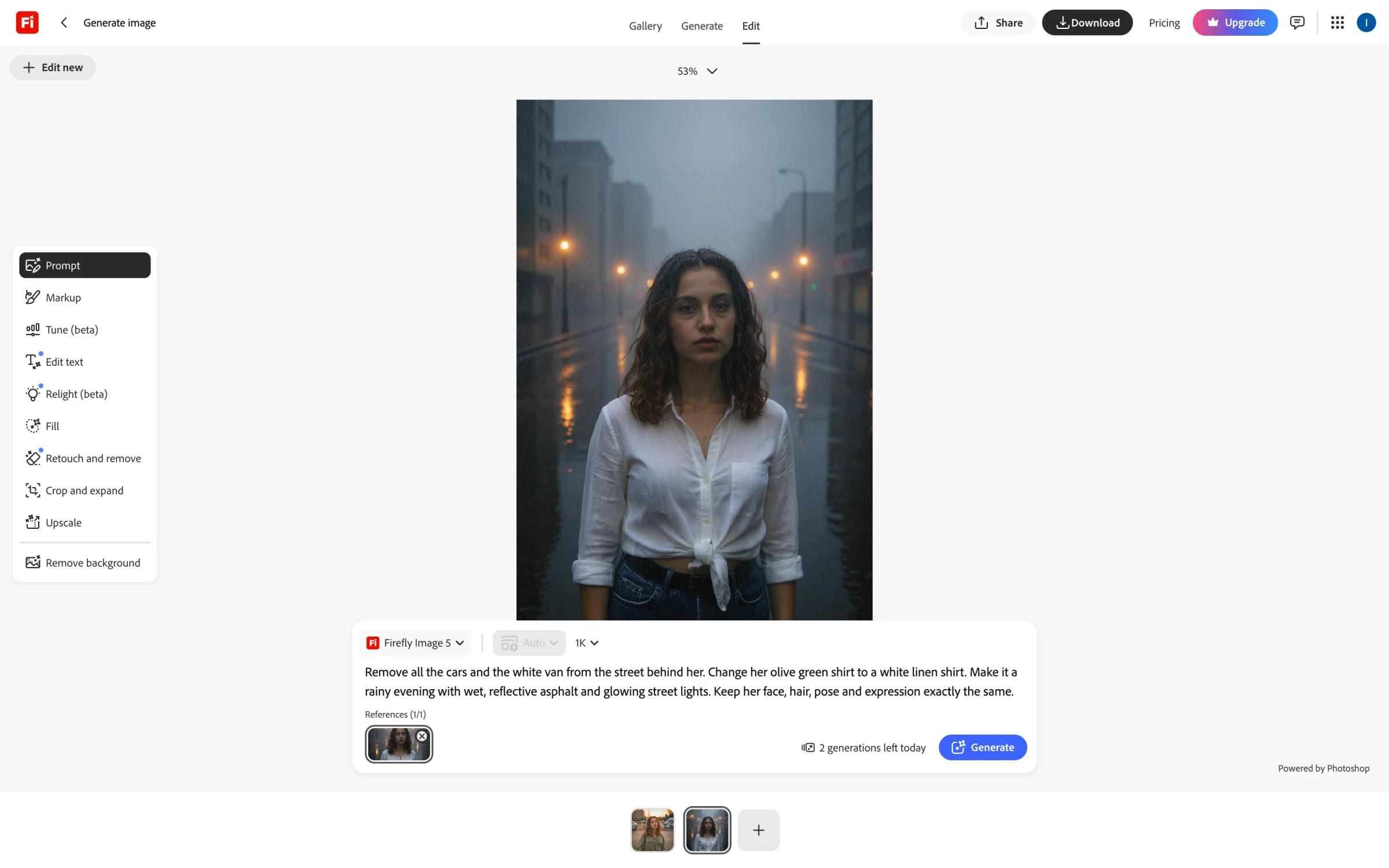
Adobe Firefly is Adobe's generative AI app. Its image editor combines prompt editing with Photoshop tools such as Relight and Generative Fill. The editor offers 13 models: Adobe's own Firefly Image 5, trained on licensed content for commercial use, and partner models such as GPT Image 2.5, Nano Banana 2 and FLUX.2. Nano Banana 2 is selected by default, so we switched to Firefly Image 5 to test Adobe's own model.
Firefly Image 5 removed the cars and made the street wet, with rain, heavy fog and glowing lamps. It changed the woman's face and hair, so the result shows a different person. The shirt also lost its pockets and got long sleeves.
The free plan includes three generations a day with Firefly Image 5. Paid plans give monthly generative credits for Adobe's models and the partner models.
Price:
| Plan | Price | Generative credits |
|---|---|---|
| Free | $0 | Daily generations |
| Standard | $9.99/month | 2,000 a month |
| Pro | $19.99/month | 4,000 a month |
| Premium | $199.99/month | 50,000 a month |
Picsart is a photo and video editing platform. Its AI Playground has about 70 image models from different companies, such as Nano Banana, GPT Image 2.5 and Seedream, and Picsart's own tools for background removal, enhancement and image editing.
Picsart's own model, Picsart Image Edit, costs 4 credits per edit, and a new free account has no credits for it. We ran the test with Flux 2 Klein 4B, a free model in the same app. It added rain, a wet street and glowing lamps, but left one car on the right side of the street. The shirt became a plain white shirt without the knot, and the face changed slightly.

Price:
| Plan | Price | Credits |
|---|---|---|
| Free | $0 | Free models only |
| Pro | $15/month | 500 a month |
Adobe Photoshop is Adobe's desktop and web image editor for professional retouching and compositing. Its AI tools include Generative Fill, which adds or replaces objects in a selected area from a prompt, Generative Expand, which extends the canvas, and the Remove tool for erasing objects and people. Generative Fill can use Adobe's Firefly models and partner models from Google and Black Forest Labs.
Photoshop works with selections and layers, so each edit applies to a chosen part of the photo. That gives more control than a single prompt, and it also means a change like ours takes several separate steps. We didn't test Photoshop because its free version works only in the mobile app.
Price:
| Plan | Price | What you get |
|---|---|---|
| Photoshop Mobile & Web | $7.99/month | Photoshop on mobile and web |
| Photoshop | $22.99/month (annual plan) | Photoshop desktop, web and mobile |
| Photography | $19.99/month (annual plan) | Photoshop, Lightroom, 1 TB of storage |
Google Photos is Google's photo storage and gallery app. Its editor includes Magic Eraser for removing objects, Magic Editor for moving and resizing parts of a photo, and Help me edit, which changes a photo from a typed or spoken request using Gemini. Help me edit is available in the Android app for users in the United States and India.
We didn't test Google Photos because these AI tools work only in the mobile app.
Price: free.
Photoroom is an AI photo editor for product photography. It removes backgrounds, generates new backgrounds and shadows, places products on AI fashion models and creates product shots in batches. Its Edit with AI tool changes an image from a text prompt.
We didn't test Photoroom because Edit with AI isn't available on the free plan: pressing Generate opens an Upgrade to Pro prompt. The Pro plan includes up to 400 Edit with AI generations a month.
Price:
| Plan | Price | Edit with AI |
|---|---|---|
| Free | $0 | — |
| Pro | $12.99/month or $89.99/year | Up to 400 generations a month |
| Max | $34.99/month | Up to 1,250 generations a month |
Fotor is an online photo editor with dozens of single-purpose AI tools, such as Magic Eraser and Old Photo Restorer. Its Agent edits a photo from a prompt in a chat panel next to the editor.
We didn't test Fotor because a new free account starts with 0 credits. When we sent the prompt to the Agent, it replied that we were out of credits and offered a paid plan.

Price:
| Plan | Price | Credits |
|---|---|---|
| Pro | $39.99/year | 100 a month |
| Pro+ | $89.99/year | 300 a month |
Pixlr is a browser photo editor with two apps, Pixlr Editor for layer-based editing and Pixlr Express for quick edits. Its AI Image Editor changes photos from a prompt with Google's Nano Banana 2 Lite model, at 12 credits per edit.
We didn't test Pixlr because a new free account has no AI credits: pressing Apply opened a "You're out of AI Credits!" window with the paid plans. The Plus plan at $1.99 a month is the cheapest paid plan in this list.

Price:
| Plan | Price | AI credits |
|---|---|---|
| Plus | $1.99/month | 80 a month |
| Premium | $7.99/month | 1,000 a month |
| Ultra | $19.99/month | 5,000–10,000 a month |
Overchat AI is the best AI photo editor: it edits photos with GPT Image 2.5, Nano Banana Pro and other top image models in one app.
Google Gemini and Google Photos edit photos for free with usage limits. Overchat AI gives free users 100 credits a day, which covers four edits with GPT Image 2.5 Flare. Canva and Adobe Firefly have small free allowances, and Fotor, Pixlr and Photoroom need a paid plan for AI edits.
Yes. On the free plan, you can upload a photo to ChatGPT and describe the change, and it returns an edited image. The number of free edits is small and changes with demand; ChatGPT Go and Plus raise the limit.
None of the six editors we tested added a visible watermark to the downloaded result. Some add invisible markers: Gemini embeds a SynthID watermark, and ChatGPT and Adobe Firefly attach Content Credentials metadata that identifies the image as AI-edited.
It depends on the editor and your settings. ChatGPT can use your chats, including uploaded photos, to train OpenAI models unless you turn off "Improve the model for everyone" in Data Controls. Gemini uses your activity to improve Google's models when the Keep Activity setting is on. Adobe doesn't train Firefly models on its customers' content.


