How to Use ChatGPT For Free: Three Popular Ways Explained
Last Updated:
2026-10-16
How to Use ChatGPT For Free: Three Popular Ways Explained
Is ChatGPT free? Yes: anyone can sign in and chat with ChatGPT at no cost, and everyday text chats are unlimited. The catch is the model and the tools. The free plan runs on GPT-5.6 Luna, the smallest model in OpenAI's lineup, caps uploads, images, and voice, and since February 2026 free users in the US also see ads. Paid plans start with the cheaper Go tier, and Plus costs $20 per month, which is more than many people want to pay if the premium features aren’t worth it to them. This raises an obvious question: how can I use ChatGPT for free and get the most out of it?
In this article, we’ll explain the main ways to use ChatGPT for free while still benefiting from its core capabilities.
What’s more, you might be surprised to learn that the free version is more than enough for most everyday tasks. We’ll also cover the best ChatGPT alternatives, so let’s get started.
Free ChatGPT runs on GPT-5.6 Luna, the smallest model in OpenAI's current lineup, and since August 2026 everyday text chats on the free plan are unlimited.
A Think button lets free users ask Luna to reason longer on harder questions, but the bigger GPT-5.6 Sol and GPT-6 Astra models are paid-only.
Free tier includes web search, image generation, voice, and file uploads (3 per day), each with its own limit — but no custom GPTs, no Projects, a smaller context window, and ads in some markets.
Privacy catch: OpenAI uses free-tier chats for training by default. You can turn this off in the Data Controls settings.
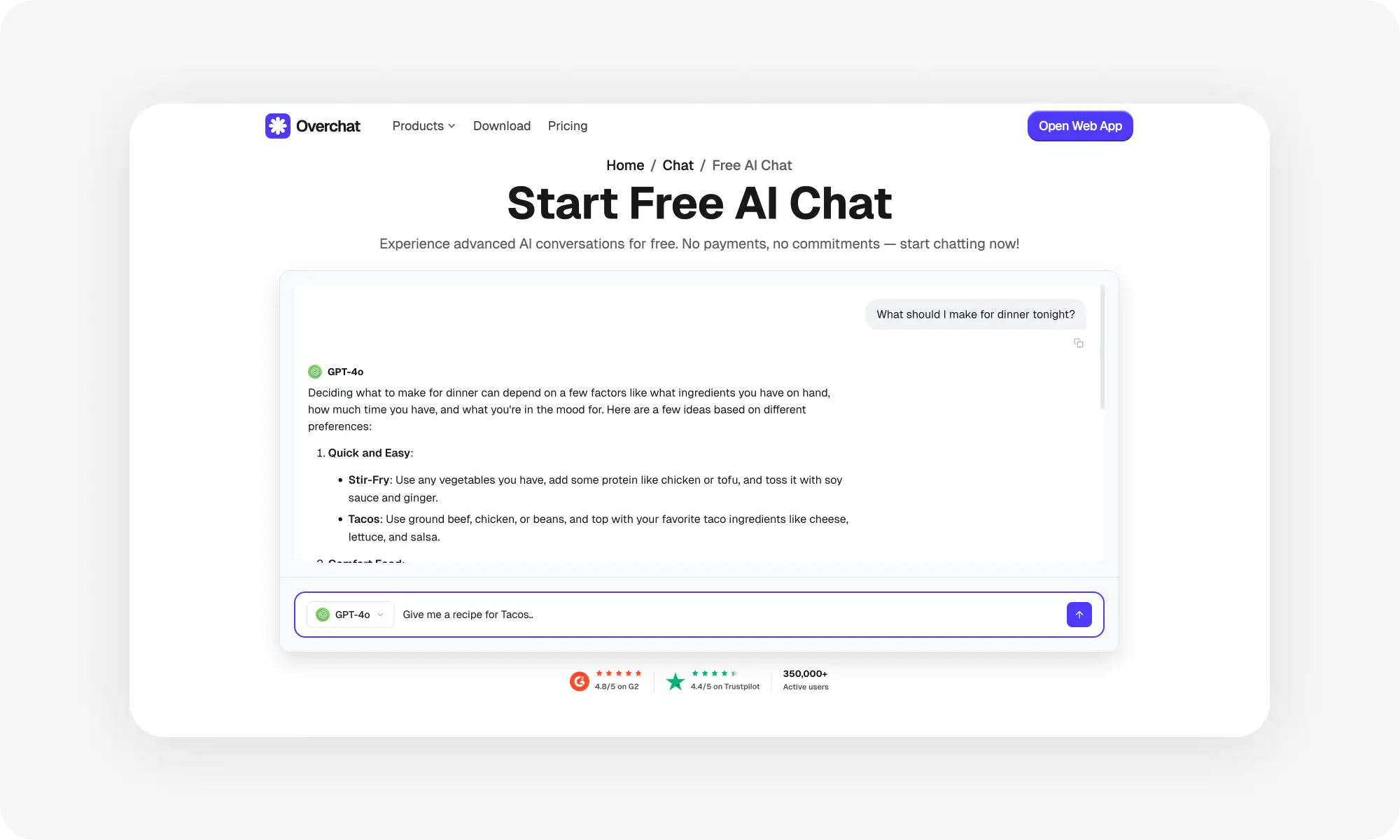
Overchat AI is a solid free alternative — one app with OpenAI's GPT models plus Claude, Gemini, and DeepSeek; several models are free to use, you just need an account.
Other solid free options: Claude Sonnet 4.5 (longer context than ChatGPT), Gemini 3 (free with a Google account), Perplexity (unlimited searches + 5 Pro searches/day with citations).
Go ($8/month) raises the free limits but keeps Luna and the ads. Plus ($20/month) unlocks GPT-5.6 Sol, deep research, agent mode, and custom GPTs. Pro ($100 or $200/month) adds GPT-6 Astra in chat and only makes sense for heavy use.
Best way to stretch the free tier: use ChatGPT for everyday chat and switch to Gemini, Claude, or DeepSeek when you need a stronger model or longer context.
Main Ways to Use ChatGPT for Free
If you want to use ChatGPT without paying for a subscription, there are three options available to you.
Use the free ChatGPT version on OpenAI's website
Try ChatGPT alternatives with better free plans
Use AI chatbots built into other apps and services
Let's break down each option.
1. Use Free ChatGPT on OpenAI's Website
OpenAI offers a free tier that lets you access ChatGPT for free. To use it, you'll need to create an account with your email address, but the sign-up process takes less than a minute.
As of September 2026, the free version runs on GPT-5.6 Luna. It's the smallest model in the GPT-5.6 family: fast and good for everyday questions, but a step below the Sol model paid subscribers get and well below the new GPT-6 Astra.
Message limits
Since August 2026, free users can send unlimited everyday text messages to GPT-5.6 Luna. OpenAI still applies abuse-prevention safeguards, so extremely heavy automated use can get throttled, but a normal person chatting through the day won't hit a wall.
The limits now sit on the tools instead of the chat. File uploads, image generation, voice, and data analysis each have their own cap, and ChatGPT tells you when you reach one.
What you can do
You'll still be able to use most of the AI tools that make ChatGPT so powerful, just with lower limits than on paid plans:
Upload and analyze images, PDFs, and text documents (up to 3 files per day)
Search the web for current information
Use GPTs from the GPT Store (pre-built chatbots for specific tasks)
Generate images, with a limited and slower allowance
Talk to ChatGPT in voice mode, with a daily cap
Access basic memory features so ChatGPT remembers your preferences
Press the Think button to make Luna reason longer on a harder question
What you can't do
The free version has some hard limits. You won't get:
Access to GPT-5.6 Sol or GPT-6 Astra
The ability to create your own custom GPTs or use Projects
Deep research and agent mode at full capacity
An ad-free experience in markets where ChatGPT shows ads
Process very large documents: the free plan has the smallest context window of any ChatGPT plan.
During peak usage times, while being on a free plan you may also run into slower response times or temporarily reduced functionality. That’s because OpenAI prioritizes paid subscribers when server demand is high.
GPT-5.6 Luna is good enough for everyday tasks: emails, answering questions, brainstorming. It's fast and a good chatbot for everyday conversations.
That said, if you need a tool for maths or coding, Luna won’t be as effective as the bigger models. It won't perform as well for coding, information extraction from large documents or maths, even with the Think button.
Unlimited chat doesn't make the free plan a work tool. The model is the limit now: for complex projects you need Sol or Astra, and those sit behind a paid plan. Therefore, while you’ll be able to use ChatGPT for free without issue, it may not be powerful enough for real-world work or study.
Understand That You’ll Have Fewer Ways to Control Data Privacy
OpenAI uses conversations from users to train future AI models, which means your chats aren't completely private. On the free plan this is switched on by default. You can turn it off in Settings → Data Controls, but you have to know to look for it.
If you're sharing anything sensitive with ChatGPT chances are somebody on the OpenAI team might see it (though it won’t be linked to your account).
Paid subscribers get more control over their data.
This is not unique to ChatGPT. Claude, Google Gemini, and DeepSeek also likely use data for data training and usually don’t give free users a way to decline participation. As a privacy focused free AI alternative, consider Overchat AI.
2. Try ChatGPT Alternatives with Better Free Plans
If you find ChatGPT's free tier too restrictive, several alternatives offer more generous limits or different feature sets. Some don't even require you to create an account.
Here's how major ChatGPT alternatives compare:
Feature
ChatGPT Free
ChatGPT Plus
ChatGPT Pro
Overchat AI
Claude
Google Gemini
Perplexity AI
Price
Free
$20/month
$100 or $200/month
Free (account required)
Free tier available
Free with Google account
Free tier available
Main Model
GPT-5.6 Luna
GPT-5.6 Sol
GPT-6 Astra, GPT-5.6 Sol
GPT-5.2, GPT-4.1 Nano and other basic models
Claude Sonnet 4.5
Gemini 3
Standard model + 5 Pro searches/day
Message Limits
Unlimited text chats, tools capped
Higher tool and reasoning limits
5x or 20x Plus usage
Varies by model
Daily cap (varies)
Generous limits
Unlimited regular searches
Account Required
Yes
Yes
Yes
Yes (free)
Yes
Yes (Google account)
Yes
Web Browsing
Yes
Yes
Yes
Depends on model
Yes
Yes
Yes (specializes in this)
Document Upload
Yes (3 files/day, small context)
Yes
Yes
Varies
Yes (longer context)
Yes (integrates with Google Drive)
Limited
Image Generation
Limited and slower
More daily generations
More daily generations
Depends on model
No
Limited
No
Custom GPTs
Use only
Create and use
Create and use
N/A
N/A
N/A
N/A
Priority Access
No
Yes
Yes
N/A
N/A
N/A
N/A
Best For
Casual use, experimenting
Regular work tasks, coding
Heavy professional use
Many AI models in one app
Writing, coding, analysis
Google ecosystem users
Research, citations
Now, let's look at the most notable apps in more detail:
Overchat AI
Overchat AI is a great free alternative to ChatGPT. To be clear, Overchat AI is not ChatGPT and isn't affiliated with OpenAI — it's a separate app where you can chat with OpenAI's GPT models alongside Claude, Gemini, DeepSeek, and dozens of others, all in one place.
Creating a free account takes under a minute — all you need is an email address or a Google/Apple login.
With a free account, you get daily access to basic models, including GPT-5.2 and GPT-4.1 Nano, at no cost. The Pro plan ($14.99/month or $49.99/year) unlocks GPT-5.5, Claude, and image models.
Claude (by Anthropic)
Claude offers a competitive free tier with access to Claude Sonnet 4.5, which is a very powerful, modern model for writing, coding, and detailed analysis. The free version includes longer context windows than ChatGPT, meaning it can handle larger documents or longer conversations without forgetting earlier parts.
You'll need to create an account, but the signup process is straightforward. Free users get a decent message cap that resets daily, though exact limits vary based on usage patterns.
Google Gemini
Google's Gemini 3 is free-to-use with a Google account. Gemini also integrates directly with Google services like Gmail, Docs, and Drive. This makes it useful if you're already in the Google ecosystem and want AI help with your existing files.
Perplexity AI
Perplexity specializes in research and information gathering. The free tier gives you access to their standard model, which searches the web and provides answers with citations. You also get 5 Pro searches per day on the free plan, which use more advanced AI models and deeper research. Regular searches are unlimited.
3. Use AI Chatbots Built Into Other Apps and Services
You might already have access to AI chatbots through apps and services you use every day, so you can get free access to an AI chat — often based on a GPT model — without needing a separate account.
Here are a few apps you may consider:
Microsoft Edge Sidebar
If you use Microsoft Edge as your browser, you get built-in access to Copilot without visiting a separate website. The sidebar appears on the right side of your browser and can help while you browse. You can ask it to summarize the current page, explain concepts, or draft responses to emails. It has access to what you're viewing, which makes it contextually aware of your current task. The feature is completely free and doesn't count against any message limits. You just need to use Edge browser, which is available on Windows, Mac, iOS, and Android.
Notion AI
Notion users get limited free access to AI features built directly into their workspace. You can use it to summarize notes, improve writing, or generate ideas without leaving your documents.
Snapchat My AI
Snapchat includes a chatbot called My AI that's available to all users for free. It uses ChatGPT technology but is customized for casual conversation and entertainment. You can chat with it about anything, ask for recommendations, or use it for quick information lookups.
Slack AI
Workplaces using Slack can access built-in AI features for free or through their existing subscription. The AI can summarize channel conversations, create thread recaps, or help search through message history. If your company already pays for Slack, you might have AI features available without additional cost.
Discord Bots
Discord has numerous free AI bots you can add to your servers. Popular options include Midjourney for image generation, various ChatGPT bots, and specialized assistants for different tasks. These bots are free to add and use, though some have usage limits or premium tiers.
What to Consider: Free vs. Paid ChatGPT
At some point, you might wonder if upgrading to a paid plan makes sense for your situation. Here’s how to decide:
When the Free Version Is Enough
You're probably fine sticking with free if you:
Use ChatGPT only occasionally
Don't mind the ads and the daily caps on uploads and images
Can work with GPT-5.6 Luna for less complex tasks
Have access to alternatives like Overchat AI or Claude when you need backup options
If you're using AI to understand concepts, draft essays, or study for exams, the free version is usually good enough for these tasks. Same goes for working with text: emails, recipe ideas, travel planning, or general questions also don't need paid access. And, there's no reason to pay $20 per month while you're still figuring out how (or if) you'll use these tools regularly.
When You Should Consider Upgrading
Some clear signs indicate you've outgrown the free tier and might benefit from a paid subscription: Consider upgrading if you:
Hit the file upload or image limits multiple times per day
Need AI for work tasks where a weaker model costs you time and money
Regularly work with large documents or use AI to write code
Need GPT-5.6 Sol, deep research, or agent mode for complex tasks
Use ChatGPT as a primary tool in your daily workflow
Whether or not to upgrade is a purely mathematical decision. If you're a developer who writes code for hours each day, the Plus plan ($20 per month) could save you hours of time spent on refactoring, finding simple bugs and creating unit tests. So, if you think that saving time is worth the $20, the decision to upgrade should be simple.
At that point, the choice is between ChatGPT Go, Plus, and Pro. Go ($8/month) only raises the free limits: you keep GPT-5.6 Luna and the ads, so it helps if uploads and images are your bottleneck, not the model.
ChatGPT Plus ($20/month) gives you:
GPT-5.6 Sol in chat, with adjustable thinking levels
Deep research, agent mode, and Codex
Ability to create custom GPTs and use Projects
Higher limits on image generation, voice, and file uploads, with no ads
Limited GPT-6 Astra usage inside ChatGPT Work and Codex
ChatGPT Pro ($100 or $200/month) is designed for power users and includes:
GPT-6 Astra in the regular chat window
5x (the $100 tier) or 20x (the $200 tier) the usage of Plus
A larger context window for long documents and codebases
Most people won't need Pro unless they are using AI very heavily — launch multiple agents or write with AI full-time.
If ChatGPT saves you more than an hour of work per week, Plus probably pays for itself. If it saves you several hours per day, Pro might make sense.
How to Maximize ChatGPT Free Tier
If you're sticking with free ChatGPT, there’s a way to make the allocated free limit go much further. Here are a few tips to get the most use out of your free ChatGPT account.
Use the Think button strategically. Luna answers quickly by default. For coding, math, or a multi-step problem, press Think before sending so the model reasons longer. Don’t bother for dinner recipes: a quick answer is fine there.
Write better prompts. Prompts are messages you send to AI. How you ask AI questions matters — by being specific and explaining what kind of outcome you want to get from the interaction, you’ll be able to get to the result with fewer messages. Here’s more about how to ask AI better questions to get better answers.
Keep track of your tool limits. Text chat is unlimited, but file uploads, images, and voice are not. You get 3 file uploads a day, so combine documents into one file when you can, and ChatGPT tells you in the interface when a tool limit is reached.
Use built-in AI tools when you can. Before opening ChatGPT, check if you already have AI available in the apps you're using. For example, your Google workspace may have text editing tools you can use to edit copy, and this way you won’t need to waste ChatGPT messages on this task
Start new chats often. ChatGPT free tier has a smaller context window compared to the paid feature. This means that it can’t remember as much in one conversation. How to get around this? It’s actually very simple — just start new chats and keep them short. There’s no limit to how many chats you can have, even on the free tier.
Batch uploads. With only a few uploads a day, don't upload files one by one across the day. Collect the documents or screenshots you need, then ask all your questions about them in one chat. A screenshot tool like ScreenSnap Pro helps here: capture just the part of the screen that matters and mark it up, so the AI knows exactly where to look.
Download or save important answers. Just in case. Copy important code snippets to your editor, save helpful explanations to notes, and export or screenshot valuable information. Context gets lost when you switch services, so don't rely on being able to access previous conversations.
Consider using multiple services.If you use the free tiers of Google Gemini and Claude, and occasionally chat with DeepSeek and Kimi, you can effectively stretch your free usage to the point where it feels unlimited (DeepSeek is actually unlimited on its free tier). The main trade-offs compared to paid plans are access to more capable models and image or video generation. Media generation is expensive, which is why it’s usually excluded from free tiers, tightly limited, or offered at much lower quality than flagship models.
Bottom Line
The free version of ChatGPT gives you unlimited text chats with GPT-5.6 Luna, plus capped access to web search, images, voice, and file uploads. For most people, that's more than enough to handle everyday tasks.
But if you need a stronger model than Luna without paying for Plus, consider a ChatGPT alternative like Overchat AI — it isn't ChatGPT, but it gives you OpenAI's GPT models (and many others) in one app, with several models free to use after a quick signup.